

XOSC
Map any input to any output — keyboard, MIDI, gamepad, serial, RFID, OSC and Art-Net in; OSC, DMX, serial and video out.
XOSC is a Windows desktop utility that started as "forward any USB input as OSC" and grew into a full live-control router: keyboard, MIDI, gamepad, serial, RFID badge taps, incoming OSC and Art-Net DMX on the input side; OSC, DMX universes with HTP/LTP merging and fixture libraries, serial commands, and frameless video-player windows on the output side. The mapping graph is React Flow in an Electron renderer; the Node main process owns every transmitter. Built for VJs and live-event operators who want "press the button you want to bind" plumbing without writing a driver.
- TypeScript
- Electron
- electron-vite
- React
- React Flow
- Zustand
- Astro
- Web MIDI API
- HTML5 Gamepad API
- node-osc
- serialport
- WebGL2
- Vitest
- NSIS
- GitHub Actions

XOSC turns whatever the operating system reports — a key on a USB keypad, MIDI Note 60 on channel 1, button 9 on a generic gamepad, an RFID badge tap arriving as a keyboard burst, an ASCII line coming out of an Arduino at 115 200 baud, or an incoming OSC or Art-Net packet — into whatever the show needs: an OSC message, a DMX universe, a serial command, or a video cue on a second monitor. Designed around Resolume Arena; works with anything that speaks the protocols. One window, no daemons, no service to install.
The input matrix
- Keyboard — any key code with modifier capture. Discrete trigger, plus ASCII string payload for receivers that want the raw key name.
- MIDI via Web MIDI — Note On/Off, CC, Pitch Bend, Program Change. Channel and note number forward as OSC args; CC numbers fan out to addressable output nodes.
- Gamepad via the HTML5 Gamepad API, polled at 60 Hz. Buttons fire discrete triggers; axes forward raw floats. Up to four pads addressable independently.
- Serial on any COM port via
node-serialport, line-buffered. Each unique line is its own trigger. - RFID — HID keyboard-wedge readers get a burst detector, so a badge tap is one clean event instead of fourteen keystrokes.
- OSC and Art-Net in — XOSC sits in the middle of a rig, not just at the edge: incoming OSC and DMX-over-Art-Net are first-class graph inputs, timecode included.
The DMX engine
Output isn't just OSC anymore. XOSC transmits full DMX universes with HTP / LTP / smart merging, sACN priorities, and ArtPoll discovery, imports fixture definitions from GDTF and the Open Fixture Library, and can drive color in HSV space. A live inspector shows every universe as a 32×16 grid with source-attributed coloring and per-universe frame rates — when a channel misbehaves mid-show, you can see which input is holding it. Frames can be captured to JSONL for later replay and debugging.
Video out, on any monitor
A PlayerOut node opens a frameless video window on any connected display — playlists, a WebGL2 effect chain, and transport commands wired into the same mapping graph as everything else. A foot pedal can start a video on the projector while the same trigger fires a lighting cue. Resolume itself gets first-class treatment via its WebSocket API with Bonjour discovery.
Signal chain
Capture → match → emit. An event arrives; the
input bus normalizes it to a stable signature
(midi:noteOn:1:60, kbd:F13,
serial:COM4:BTN1_DOWN); the React Flow mapping
graph routes it to every wired output node; each output node
owns its destination and emits. Pulse,
Toggle, and Hold arg modes
determine the payload shape, and multiple outputs fire in
parallel — two Resolume machines, a lighting desk, and a video
wall at the same time.
How it's split
The renderer is React + React Flow: the mapping graph, the
listeners that don't need Node (keyboard, Web MIDI, Gamepad
API), and every UI surface — including a nine-pane settings
router with a context-aware help drawer. The main process owns
the Node-only pieces: the node-osc UDP sender,
the DMX/Art-Net transmitters, serialport,
Resolume's WebSocket, video-player windows, Electron's
globalShortcut, and persisted configuration. IPC
is a thin command channel — the renderer asks; main streams
events back.
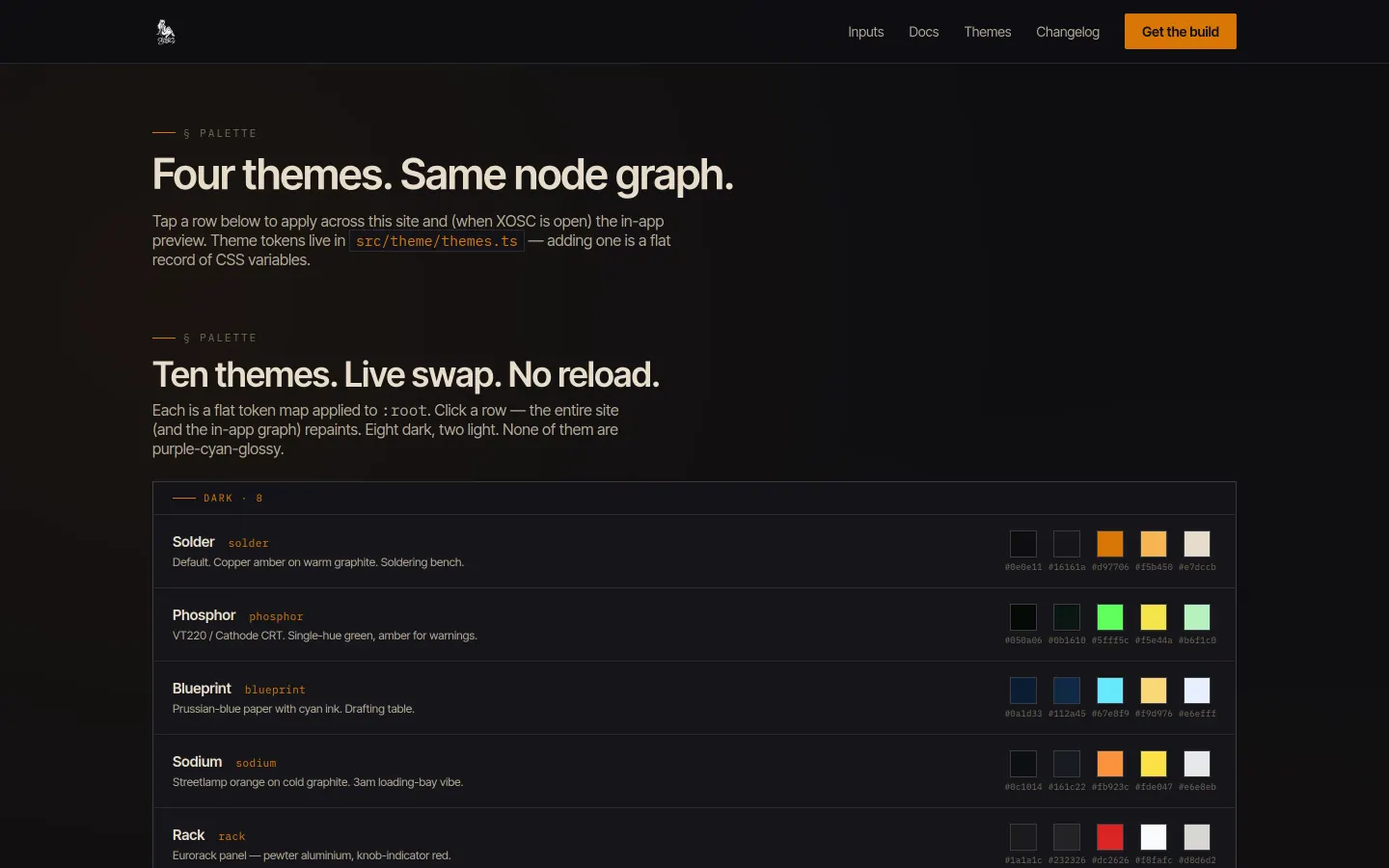
Ten themes, no purple-cyan-glossy
The whole UI is driven by a flat token map applied to
:root — eight dark themes (Solder, Phosphor,
Blueprint, Sodium, Rack, Console, Vapor, Obsidian), two light
(Bone, Newsprint), and a custom theme editor for rooms that
need their own palette. Each one repaints both the marketing
site and the in-app graph live with no reload. The defaults
are tuned for FOH operators staring at the screen for hours —
high-contrast monospace, no gloss, no gradients, no glow.
How it ships
Tagging vX.Y.Z kicks GitHub Actions, which builds
on windows-latest, runs NSIS for
the installer, and uploads
XOSC-Setup-X.Y.Z.exe to the GitHub release. The
Astro site at xosc.gamingworld.uk
auto-fetches the latest release for its download button. The
whole pipeline is just release patch →
git push --tags. Windows 11 only, unsigned, by
design — the rig machines it targets are Windows boxes.
Why "XOSC"
The X stands for "any" — any input, any output, any receiver. The original brief was a single binding for one Resolume macro from a USB foot-pedal; once the mapping graph existed, every other input class was a half-day of plumbing — and then the outputs got the same treatment.
Straight from the source
The project's own README.
Rendered in place — every link, image, and code block carried over from the repo. The page below is what a contributor would see opening the project for the first time.
XOSC
Map any input → any output. Built for Resolume, works for anything.
XOSC is a tiny Electron app that listens for keyboard, MIDI, gamepad, serial, OSC-in, Art-Net DMX, or HID-keyboard RFID input and forwards it as OSC, DMX, serial, or video-player commands to wherever you need it.
It's the FL-Studio-style "press the button you want to bind" experience, applied to the full A/V plumbing stack.
- Site & download: https://xosc.gamingworld.uk
- Platform: Windows 11 only (Peak Technologies publisher; unsigned).
What's in v0.8.0
- Settings router — full-screen Settings modal (Ctrl+,) with 9 panes, every interactive control tooltipped, and a context-aware help drawer (
?button per pane). - DMX protocol depth — HTP / LTP / smart merge, sACN priority byte, ArtPoll discovery, GDTF / QXF / OFL fixture imports, color-space-aware HSV output, Art-Net Timecode RX, and per-frame JSONL capture.
- Live DMX inspector — 32×16 grid, source-attributed coloring (graph, pad, art-net-in, test), per-universe FPS + priority overrides.
- RFID input — HID-keyboard burst detector with configurable terminator / burst rate / prefix, per-reader test scan, and a global "scan now" listen-mode overlay. New
RfidIngraph node. - Video player windows — frameless playback windows on any monitor, named playlists with enable/disable + reorder, WebGL2 effect chain interface (passthrough in v1, room for crossfade / grade / etc), and a
PlayerOutgraph node with play / advance / random / fade actions.
Repo layout
xosc/
├── VERSION                  # single source of truth
├── AGENTS.md                # shared agent conventions and verification rules
├── HANDOFF.md               # current state, risks, and next priorities
├── .codex/config.toml       # Codex project defaults
├── justfile                 # `just` for everything
├── package.json             # Electron app
├── electron/                # main + preload (Node)
├── src/                     # renderer (React)
├── installer/nsis/          # NSIS script
├── scripts/                 # bump-version, changelog
├── web/                     # Astro site (xosc.gamingworld.uk)
├── docs/                    # markdown source — published to web
├── CHANGELOG.md             # auto-appended on release
└── .github/workflows/       # build + release + deploy
Building
You need: Node 20+, just, and on Windows: NSIS for the installer.
just                     # list recipes
just dev                 # hot-reload Electron
just build               # produce dist/xosc-X.Y.Z.exe
just package             # + NSIS installer dist/XOSC-Setup-X.Y.Z.exe
just release patch       # bump → build → package
Cutting a release: tag vX.Y.Z and push. GitHub Actions builds on windows-latest and uploads the installer to the GitHub release. The website auto-fetches the latest release for its download button.
Architecture in one paragraph
Renderer holds the mapping graph (React Flow), browser-backed inputs including
HID-keyboard RFID, routing, DMX composition/sequences, and every UI surface.
Main owns Node/native work: OSC UDP, Resolume WebSockets, serial I/O, DMX
transmitters and Art-Net services, global shortcuts, discovery, lifecycle
diagnostics, video-player BrowserWindows, and the JSON config in the Electron
user-data directory. IPC is a typed bridge shared by main, preload, and renderer;
player windows use the same preload through the restricted window.xoscPlayer
surface.
See docs/ for the user-facing manual and HANDOFF.md for the current
engineering state.
Gallery
The full set.
Build something like this
Want a tool like this for your shop?
We've shipped this kind of thing before. Twenty-minute intro call, no slides.