
Samsara
A white-label AI photo booth that runs on the booth itself — a guest picks a world, steps in front of the lens and leaves with a print and a photo on their phone, with no internet required.
Samsara is a photo booth for event operators, sold under their brand rather than ours. A guest picks a world — a sailing deck, an enchanted glade, a starship bridge — and the booth cuts them out of the camera frame, stands them in the scene with its light, shadow and colour matched, adds the event's frame and banner, and hands back a print and a QR code their phone can open over the booth's own Wi-Fi. Everything runs locally: a CPU alone makes a finished photo in seconds, an NVIDIA card adds a light AI harmonising pass that keeps the guest's face their own, and cloud models are an optional extra that is off, and a dry run, until the operator says otherwise. Around that core sit seven capture modes (photo, strip, boomerang, video clip, group, backdrop, surprise), looks and drag-on props, content packs that are refused on a single wrong hash, a hardware self-test that picks the fastest path a given machine can actually run, and a privacy model where the raw camera frame never touches the disk and finished photos delete themselves. It is in active development: Windows builds are the main target, macOS builds are a preview, and both installers are unsigned by decision.
- JavaScript
- Electron 33
- Python 3.12
- FastAPI
- Uvicorn
- ONNX Runtime
- DirectML
- PyTorch
- diffusers
- Stable Diffusion XL
- NumPy
- Pillow
- OpenCV
- segno
- cryptography
- WebGL2
- ffmpeg
- electron-builder
- NSIS
- GitHub Actions
- uv
- pytest
- just

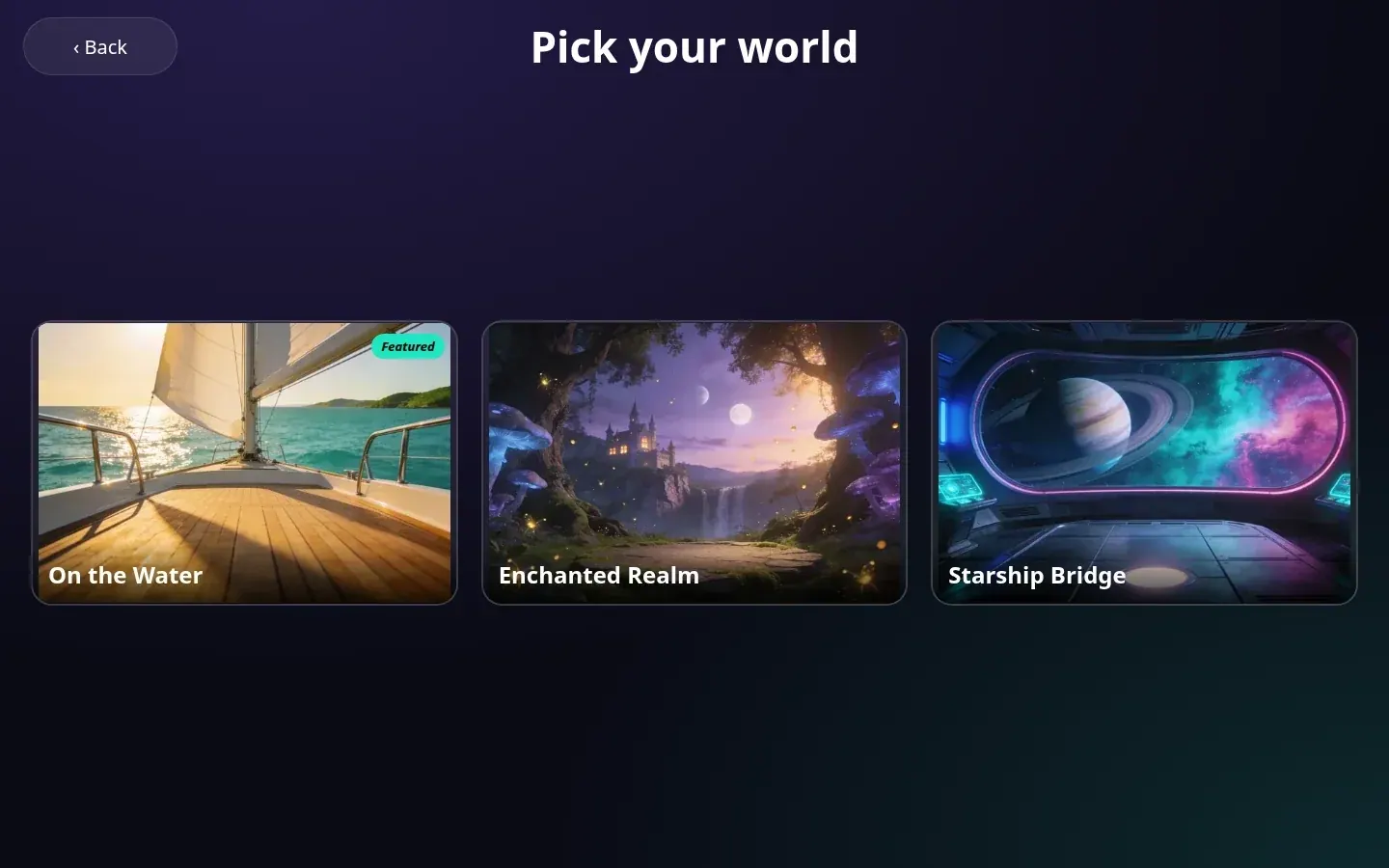


Samsara is an AI photo booth for event operators, built to be white-labelled: the event's name, tagline, logo and colours are set in the booth's own admin, and the guest never sees ours. A guest taps to start, agrees to a short consent screen, picks what they want to make and which world they want to be in, and poses. The booth cuts them out, places them in the scene and returns a finished photo with a print button and a QR code.
Offline first, in tiers
Everything a guest needs runs on the booth. The base tier works on any CPU: a cut-out model run through ONNX Runtime, then a compositor that reads each scene's own metadata — where a person stands, where the floor is, which way the light falls and in what colour — to place the guest, relight them, add a rim, a light wrap and a shadow, and grade the result. A guest cut off by the bottom of the camera frame is placed with that edge on the bottom of the photo, so nobody floats. With a fast cut-out model this takes well under a second on a desktop CPU.
On a machine with an NVIDIA card of 8 GB or more, a second tier runs a short Stable Diffusion XL img2img pass at low strength with the theme's prompt, then blends the guest's face, and partly the body, back from the original composite so the person in the photo is still the person who stood there. Making that fit an 8 GB card meant keeping the text encoders on the CPU behind a per-prompt cache and tiling the VAE. Every tier starts from the base composite, so if the AI pass fails the guest still gets a photo.
Seven ways to make something
The operator switches each mode on per event: a single photo; a classic strip of three or four poses, printed two to a 4 x 6 sheet with a cut line; a boomerang loop saved as GIF, animated WebP and MP4; a short video clip with the frame on every frame; a group mode that either widens the scene for one shot or takes people in turns and lines them up as one lit group; a plain backdrop swap; and Surprise me, which picks the world and the look for the guest. A review screen offers eight looks and a tray of props to drag, scale and rotate, and the server re-renders the real photo with them rather than trusting the preview. Every mode runs on the CPU-only tier.
The wait is part of the show
While a photo is processed, a small WebGL2 scene lifts the guest out of their own picture with the real cut-out, flies them into a miniature of the chosen world and lands a frame before the reveal. Under it, the percentage and time left come from this booth's own measured stage times, and the step list reports real numbers ("Found you — 1 person · 0.2 s"). On a weak machine it steps down to a lighter 3D scene, then 2D, then a calm screen, by frame rate.
Content that cannot be tampered with quietly
Themes are content packs: scenes with their placement and lighting metadata, a thumbnail, an overlay, a grade and a prompt. A theme zip carries the hash of every file, and an import is refused on any mismatch, extra or missing file, path escape, symlink or disallowed type, staged in a temporary folder so a refused import leaves nothing behind. The default theme can be pinned by content hash; if its files change, a booth locked to it pauses rather than run something nobody approved. Model packs for offline setup follow the same rules and can be imported from a USB stick.
Fitted to the machine it lands on
A hardware probe reads the GPU, VRAM, NPU, CPU features, memory and disk on Windows, macOS and Linux, then a self-test tries each backend and cut-out model in a child process with a time limit, so a hung graphics driver costs one trial rather than the booth. A GPU result is kept only if its mask matches the CPU's and it is actually faster. The admin shows plainly what this booth can and cannot do, and why, with measured times.
Privacy as a default
The raw camera frame is never written to disk, no face embeddings or biometrics are computed, and finished photos are deleted after a retention window (24 hours by default). The share page is the only thing the local network can reach. Optional cloud models need a separate, never pre-ticked consent line from the guest, run behind per-photo, daily and per-event spending caps the operator sets, upgrade the photo under the same QR link when they succeed, and leave the local photo in place when they do not. Admin sits behind a hidden gesture and a PIN with a server-side lockout.
Where it stands
Samsara is in active development; the current version is 0.1.2. Windows 11 is the main target, built in CI as an NSIS installer with a bundled Python runtime. macOS builds for Apple Silicon and Intel are a preview: they pass install, start and real-photo smoke tests on CI runners but have not yet been run at an event. Linux builds exist and are not offered. The installers are unsigned by decision, so the staff guide walks through SmartScreen and Gatekeeper and gives the SHA-256 to check each file against. The staff guides — web and in-app Help — are built from one source, with screenshots redrawn by script. Support for DSLRs, a phone as remote or camera, and a second screen is built against the vendors' documented interfaces and tested with fakes, but has not yet met the real hardware.
Build something like this
Want a tool like this for your shop?
We've shipped this kind of thing before. Twenty-minute intro call, no slides.